Your dock has the capacity. Your team has the skills. But somehow you're processing fewer trucks per day than your doors should handle, and your team is working harder — not smarter — to keep up.
This is the efficiency paradox that lean warehouse teams know too well. The dock isn't underperforming because of what happens when trucks are being unloaded. It's underperforming because of all the time between loads — the waiting, the coordinating, the interruptions, the scrambling.
The average unscheduled warehouse dock runs at 45-55% utilization. That means nearly half your dock capacity sits idle on any given day, even while your team feels constantly busy. The gap between busy and productive is where dock efficiency lives.
Where Dock Efficiency Gets Lost
Efficiency doesn't disappear in one big failure — it leaks away in dozens of small ones. Understanding the leaks is the first step to fixing them.
Idle time between trucks. When arrivals cluster in the morning, your dock runs at 100% for two hours and then sits at 20% for the rest of the day. According to Warehousing & Fulfillment, the aggregate utilization in this pattern is often just 50%. Spreading arrivals evenly would give you consistent 80% utilization with less stress on your team.
Check-in interruptions. Every time a driver arrives, someone on the dock has to “stop what you're doing, walk over, check them in.” That's 5-10 minutes of productive dock time lost per truck. For 10 trucks a day, your team loses 50-100 minutes just on reception duties — the equivalent of processing one or two additional trucks.
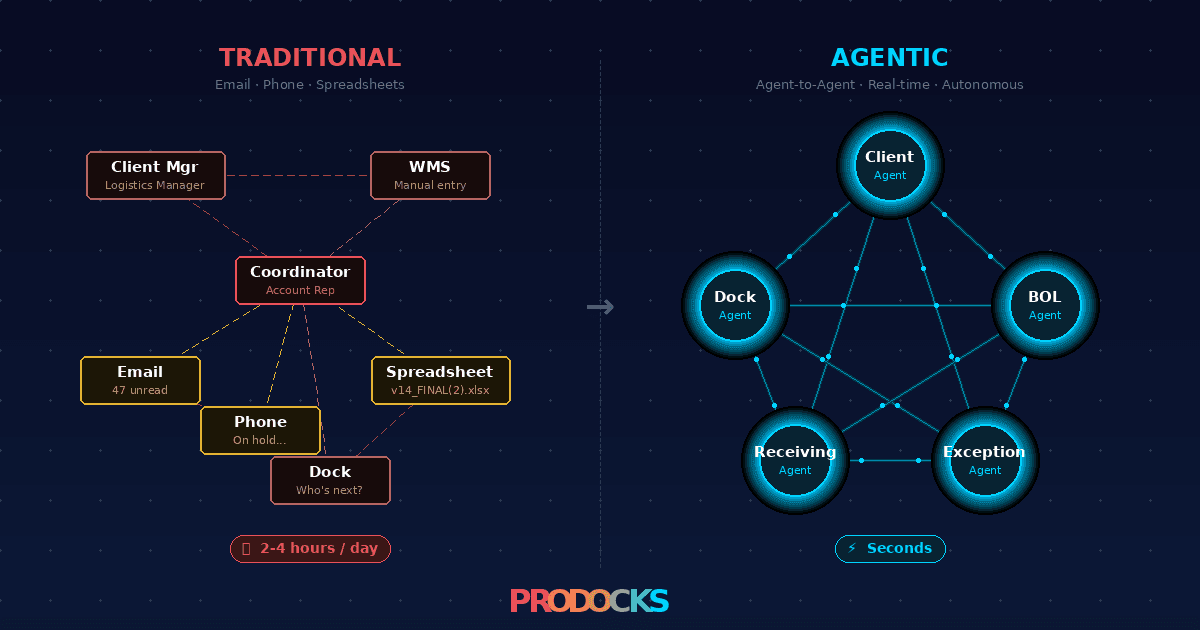
Coordination overhead. The scheduling back-and-forth via email and phone doesn't just waste admin time — it wastes dock time. Unconfirmed appointments lead to no-shows (empty dock hours) and surprise arrivals (congestion spikes). Your dock plan exists only on paper, if it exists at all.
Lack of preparation time. When you don't know what's coming until the truck is at your gate, you can't stage equipment, clear dock space, or allocate the right labor. The first 10-15 minutes after each arrival become prep time that could have happened in advance.
6 Ways to Improve Dock Efficiency
1. Match Arrivals to Your Actual Capacity
The single most impactful efficiency improvement is ensuring trucks arrive at a pace your dock can handle. If you can process one truck per door per hour, and you have two doors, your capacity is two trucks per hour — not five at 8 AM and zero at 2 PM.
Structured appointment scheduling enforces this naturally. You define your available slots based on actual capacity, and carriers book into those slots. The result: steady, predictable throughput all day instead of feast-and-famine cycles.
2. Eliminate the Check-In Bottleneck
Manual check-in is the most underestimated efficiency killer. It's not just the time spent checking drivers in — it's the context-switching cost. Every interruption breaks your dock team's workflow and adds 2-3 minutes of recovery time beyond the check-in itself.
QR self-service check-in reclaims all of this. Drivers scan a code on arrival. The system logs timestamps and notifies your team. No walking over, no clipboard, no interruption. Your dock crew stays on the dock doing what they're paid to do.
3. Give Carriers Self-Service Booking
Every phone call and email chain about scheduling is time your operations team isn't spending on actual operations. A typical dock manager spends 60-90 minutes per day on scheduling coordination — confirming appointments, fielding reschedule requests, and untangling double-bookings. It's also the part of dock work most likely to disappear first — see where AI agents are taking dock scheduling.
Carrier self-booking eliminates this entirely. Carriers see available slots and book themselves. No phone tag, no email ping-pong. The scheduling coordination that used to consume 75+ minutes per day drops to near zero.
4. Use Data to Find and Fix Your Bottlenecks
Without timestamps, you're guessing at where efficiency gets lost. The Inbound Logistics recommends digital dwell time tracking as the foundation of dock optimization. With digital check-in, you get data for every truck — arrival time, door assignment time, departure time.
The patterns tell you what to fix. Maybe your Thursday afternoon slot consistently runs 30 minutes over because it's floor-loaded containers. Maybe one dock door has 20% longer turnaround because the forklift approach angle is awkward. Data turns vague “we need to be faster” into specific, actionable improvements.
5. Extend Visibility to Reduce Reactive Scrambling
When you can only see a few days ahead, every day starts with uncertainty. What's coming? How many trucks? Do we have enough people? This uncertainty forces your team into a reactive posture that's inherently less efficient than planned work.
Extending your scheduling window to two or three weeks changes the dynamic. You can see Tuesday's heavy schedule on Friday and adjust staffing. You can identify gaps and offer those slots to carriers who need flexibility. One warehouse operator called this ability “huge” — and it's the kind of improvement that compounds over time.
6. Capture Documents at the Dock, Not After
BOL capture, damage documentation, and delivery confirmation are necessary tasks — but when they happen after the truck leaves, they become a separate work stream that eats into other productive time. When documentation happens at the dock during processing, it's part of the flow rather than additional work.
Digital document capture also eliminates the disputes and follow-up calls that come from missing or unclear paperwork. Less post-delivery cleanup means more time available for actual dock operations.